Register the custom storefront in shopify
To start off, you have to register the shophub storefront in the shopify backend. Shopify will then grant us an access token, which is required to proceed further.
Shopify settings
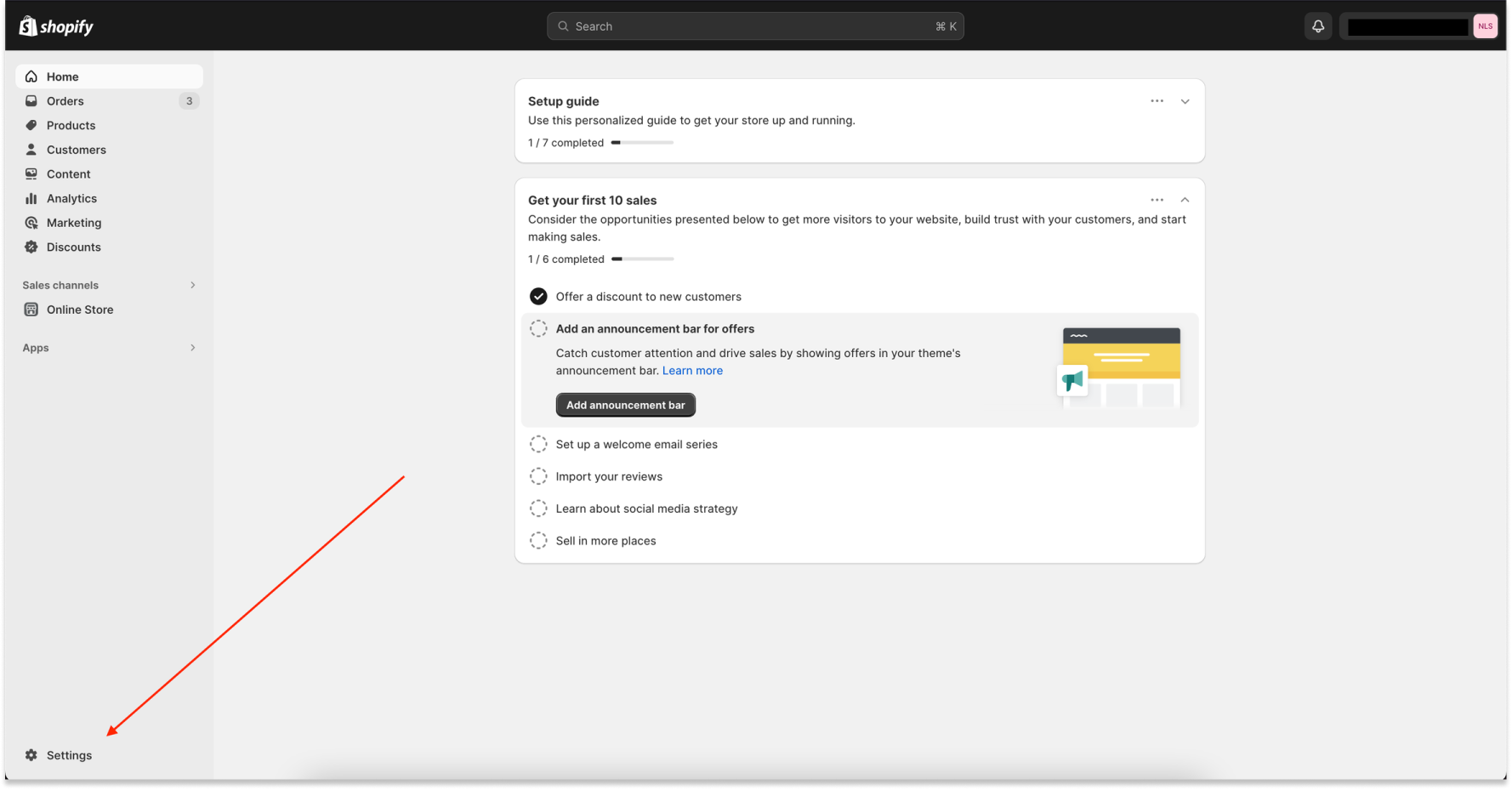
At the bottom left on the admin panel is a ⚙️ settings button. Click it.
Shopify Apps and sales channels
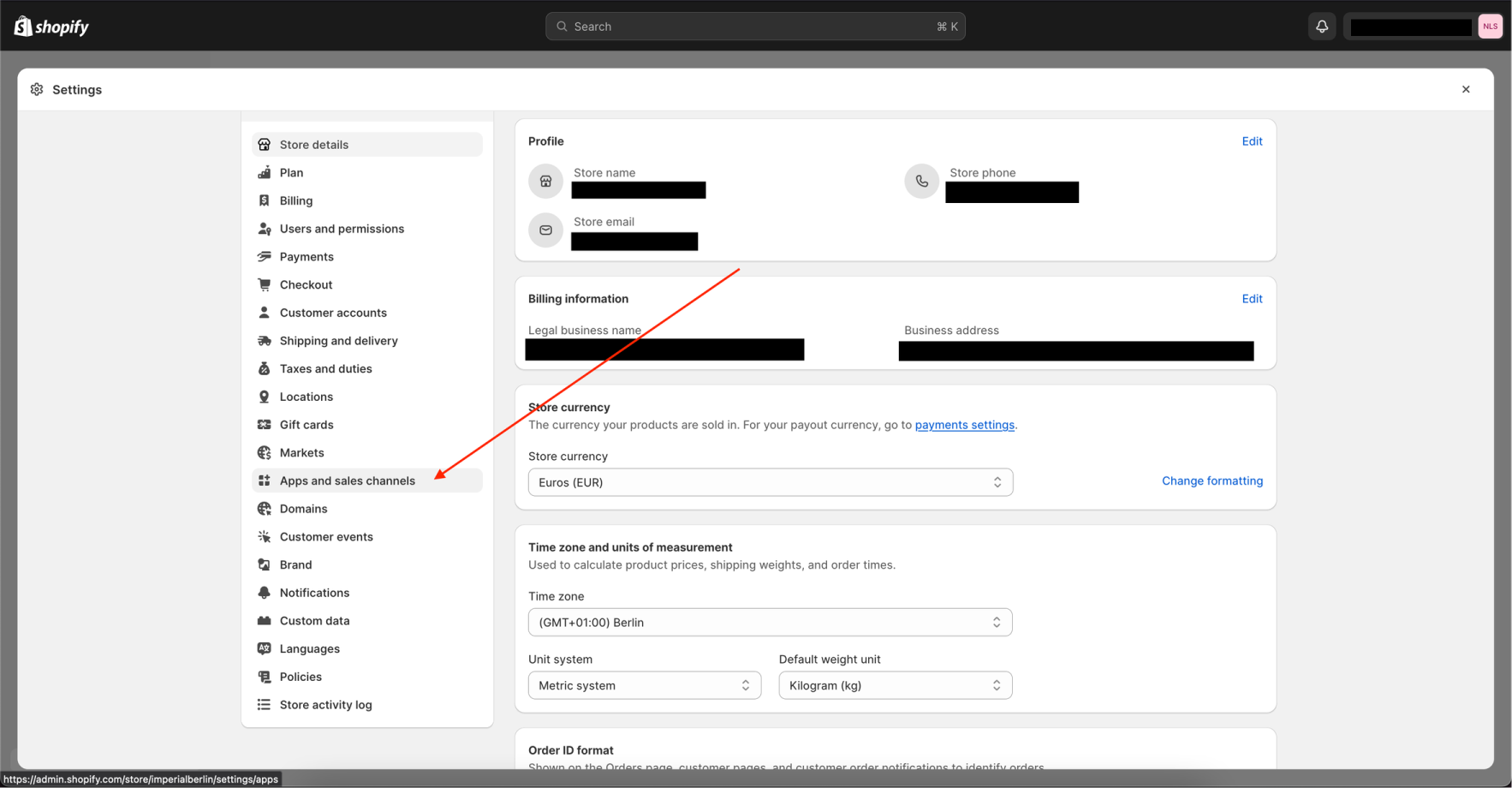
This will open an overview of all settings related to your shopify store. Look for the Apps and sales channels option.
Allow custom app development
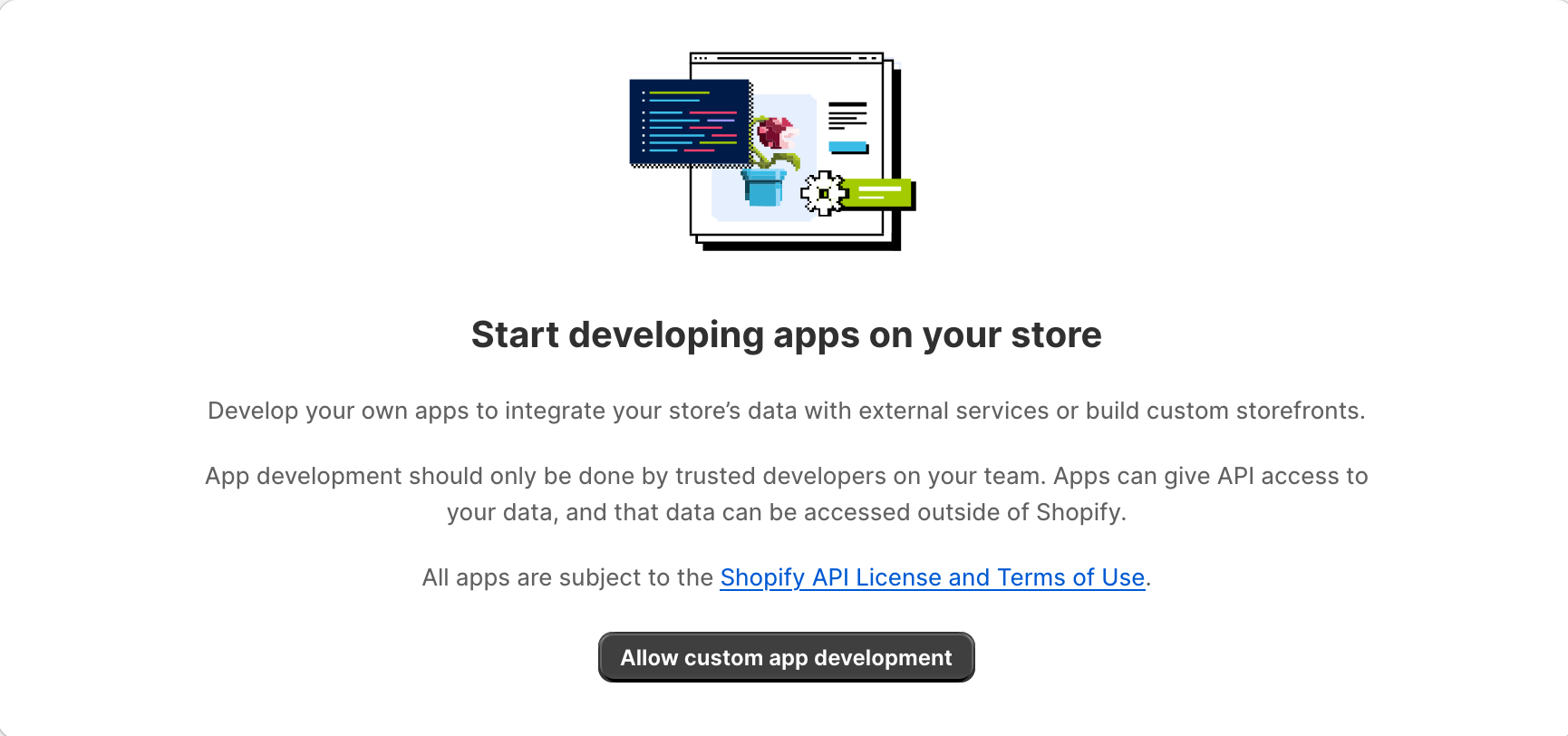
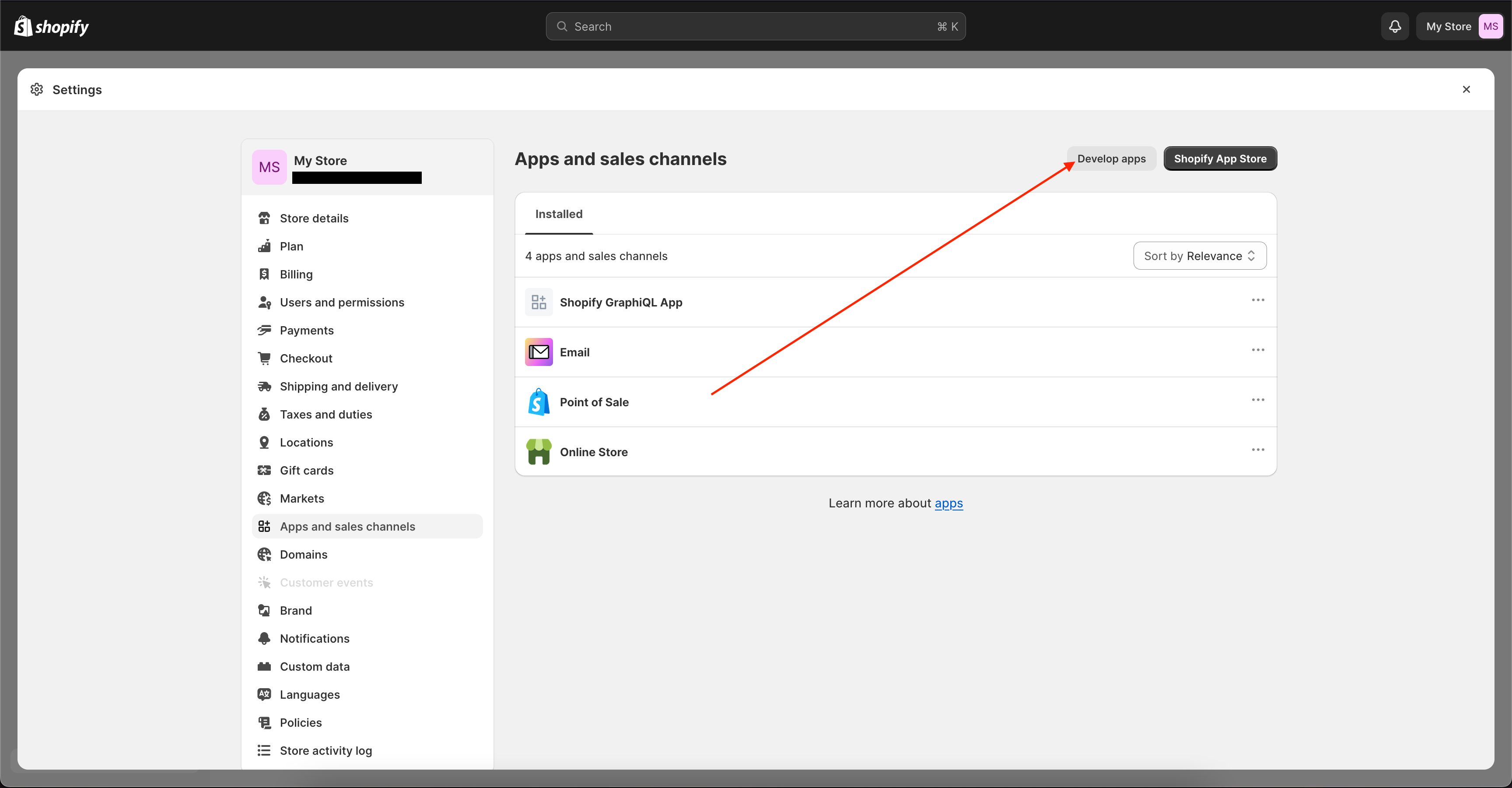
In the top right corner will be a button develop apps and after clicking that a button named create an app will be visible. You might happen to see a prompt first, asking if you want to allow custom app development.
- Yes you do!
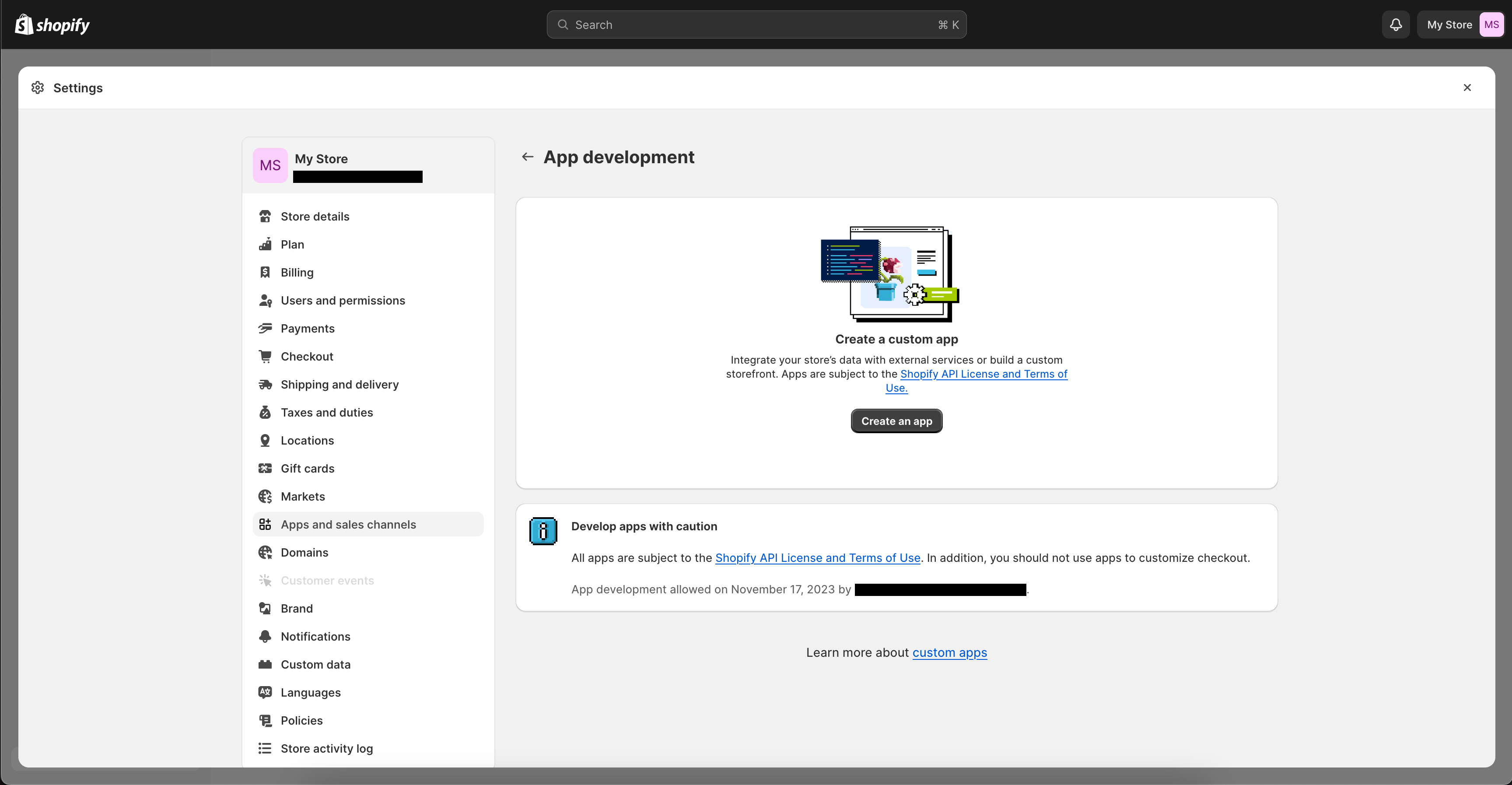
Create an app
In the Create an app pop-up give your app a proper name and select your lead developer for that app.
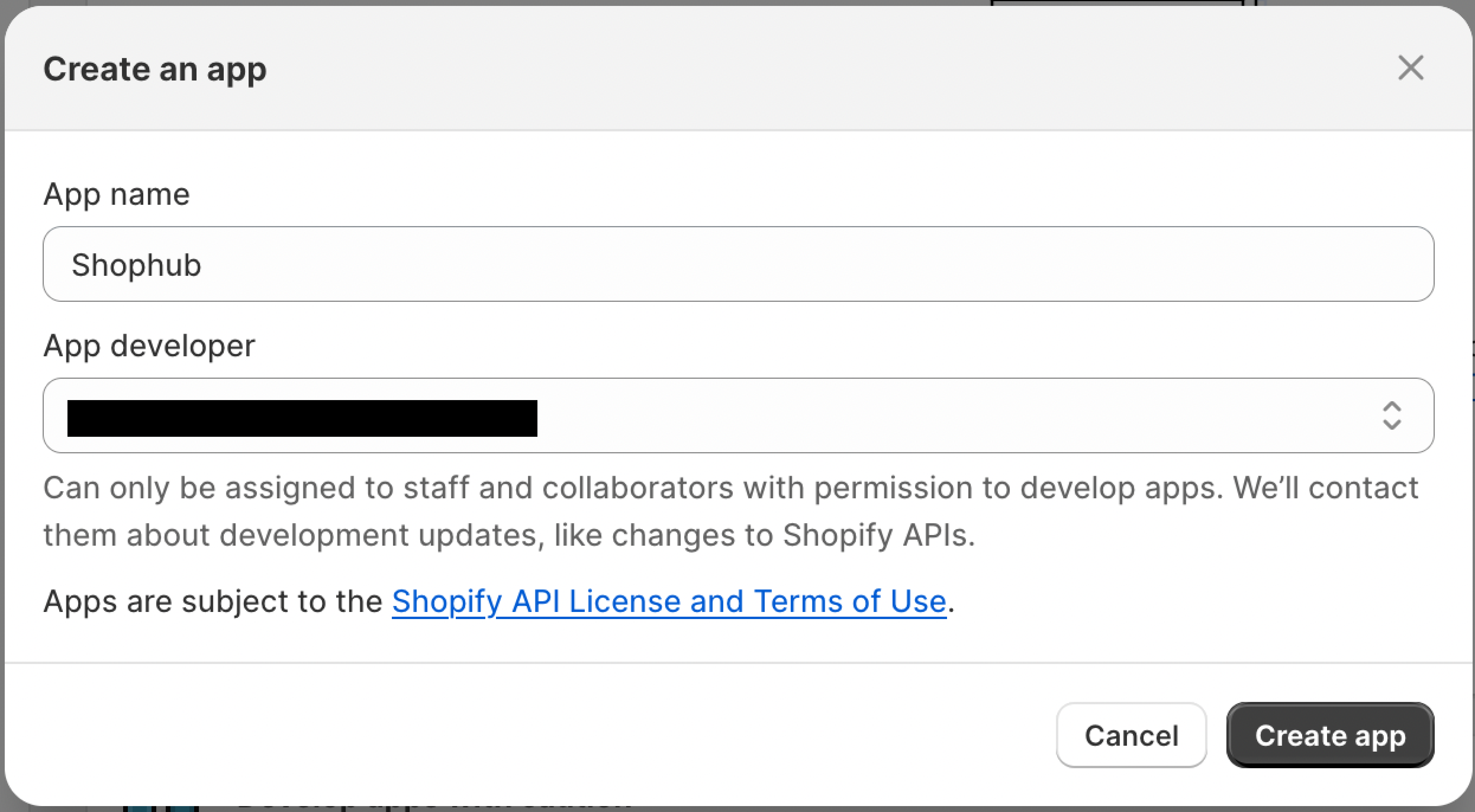
API token scopes (permissions)
Now that we created our development app, it’s time to give it some permissions to interact with the shopify store. We have two types of permission sets:
- The Admin API (Admin operations that should only run in the backend)
- Storefront API (All things that are executed in the frontend, by the user for example) We will need both. Let's start with the storefront API scope.
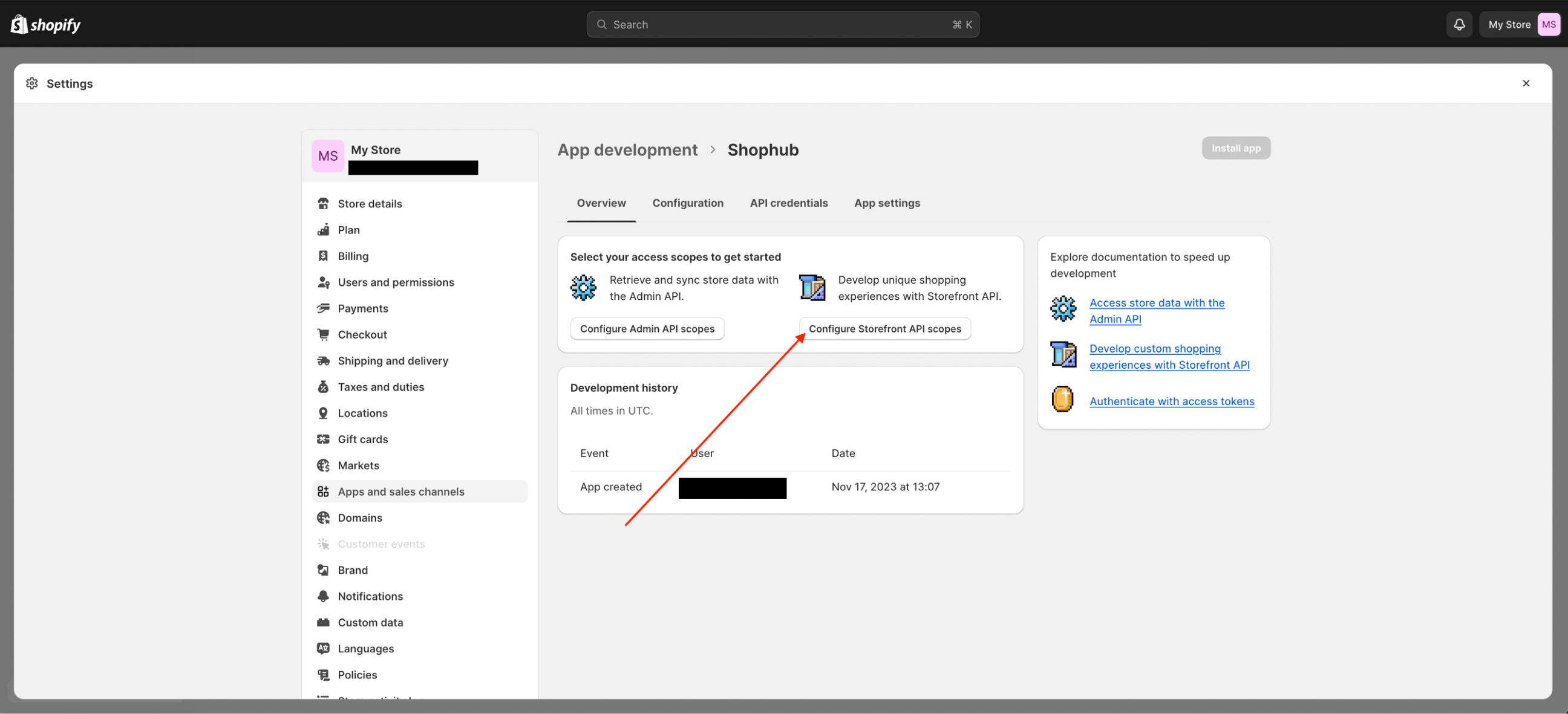
Storefront API scope
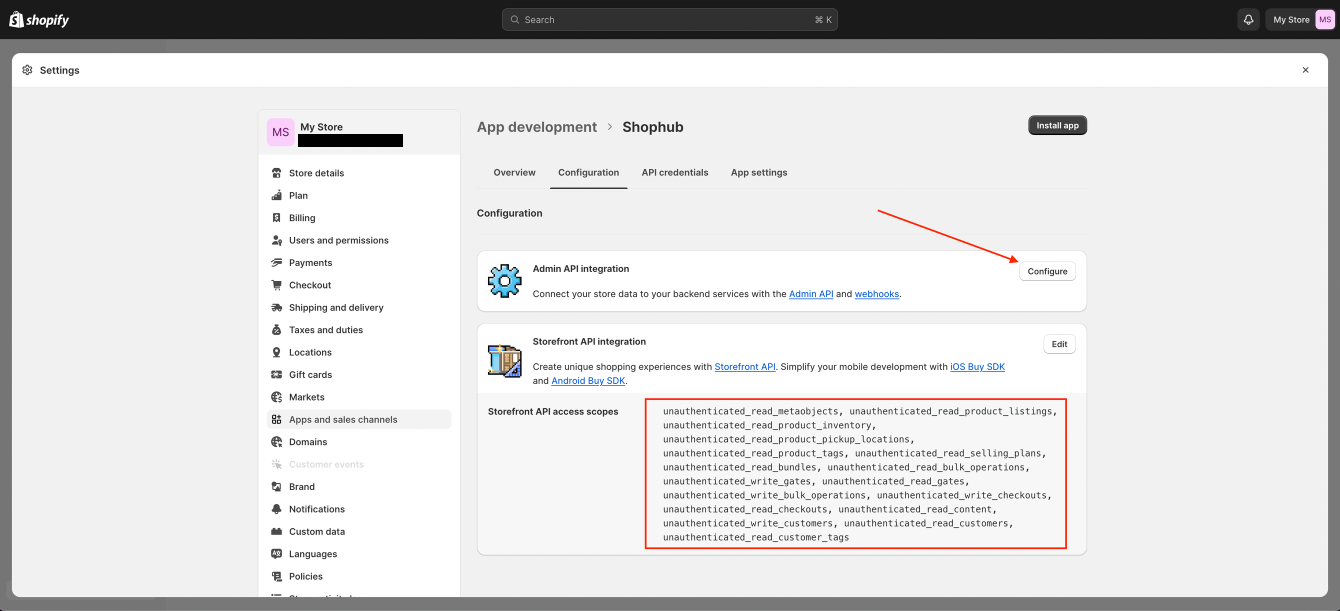
Select all permissions you want to grant the app and confirm your selection by pressing the Save button.
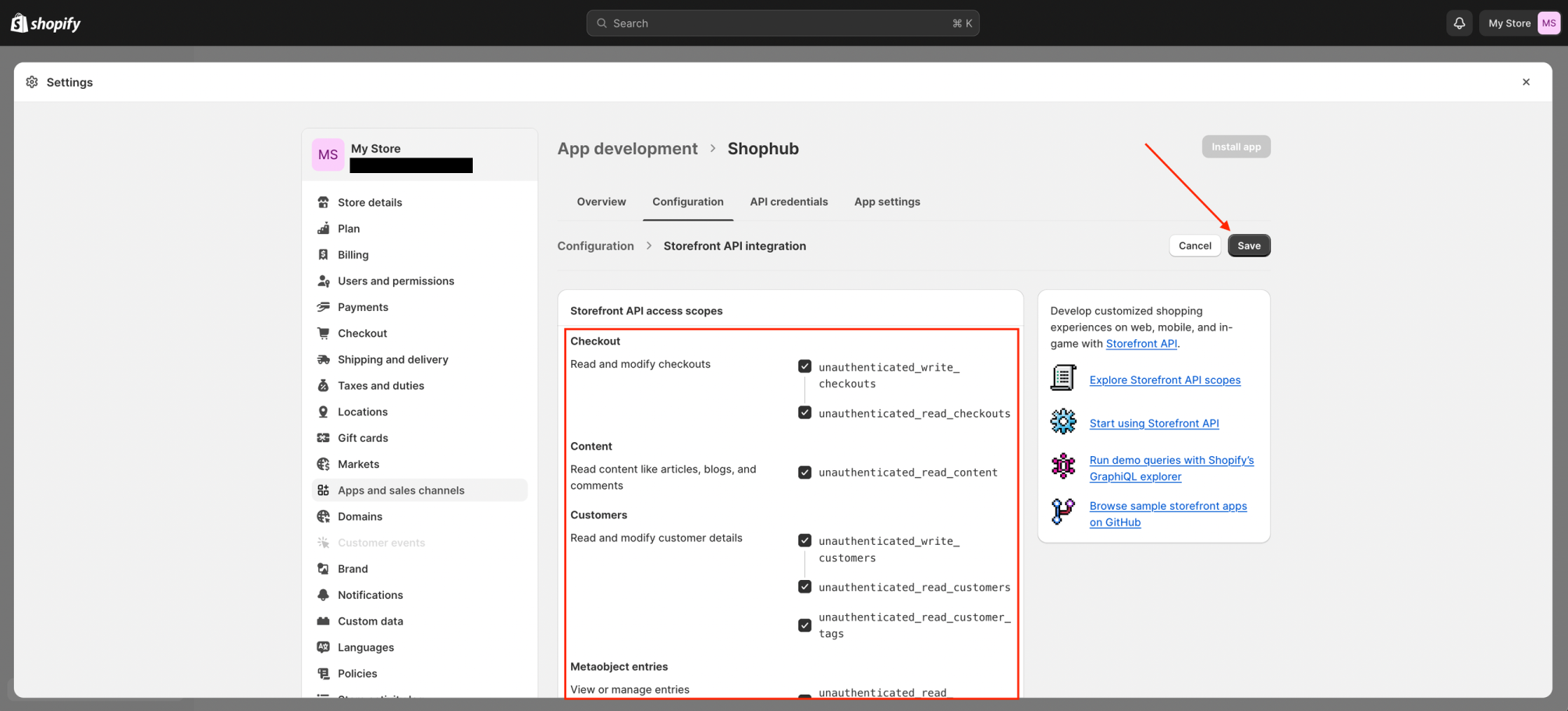
Admin API scope
Checking the Configuration tab, assures that the rights are properly granted to our app and we can now proceed to do the same for the admin API scope. Click on the Configure button next to the admin API integration banner.
Access tokens
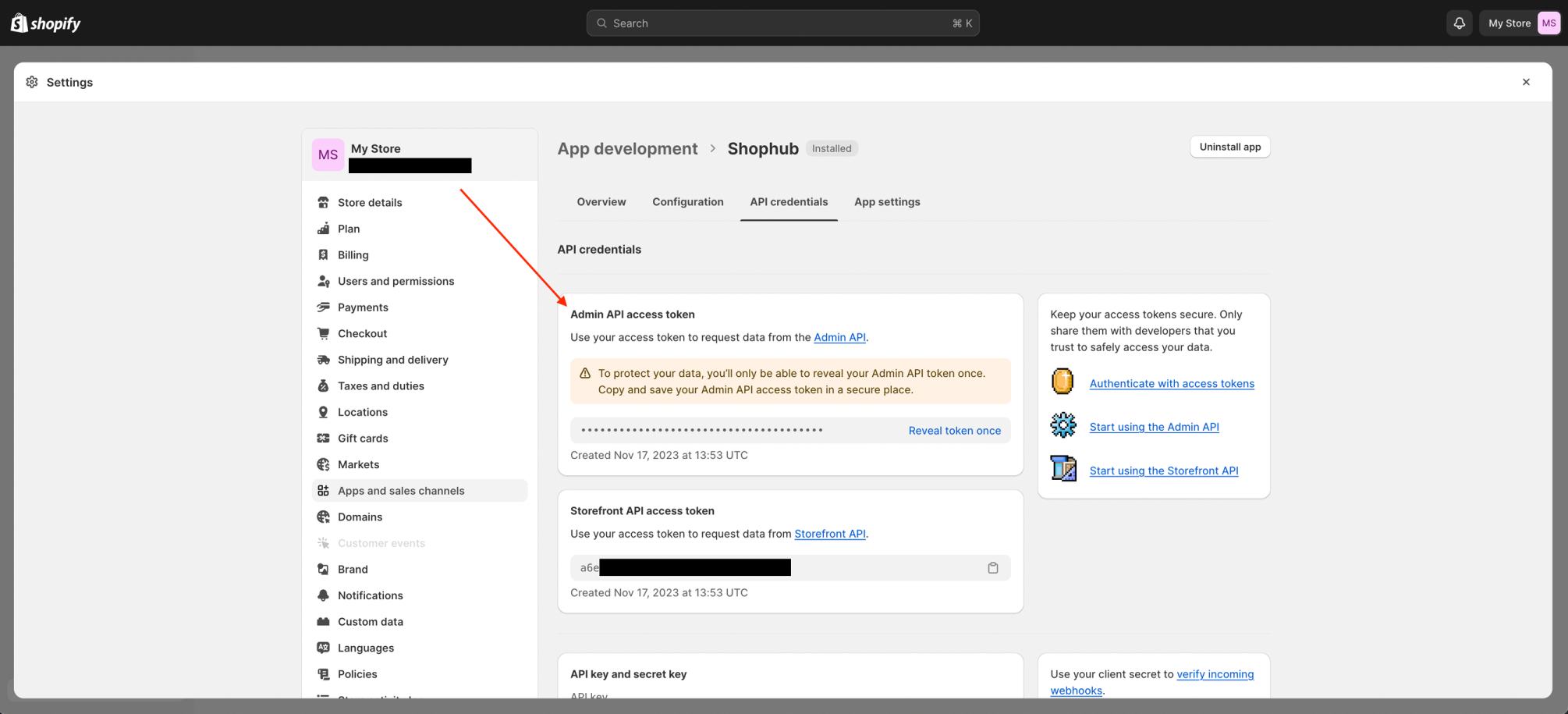
Now that the app has all permissions it needs, we can install it. For that click the button on top right, which states Install app. Once the app is installed we can copy the admin API token, which is found in the API credentials tab. Since you can only reveal the admin token once, store it safely somewhere. The storefront access token can also be accessed later on.
Creating a delegate access token
Now that the app is installed and has permissions to make requests against the admin and storefront API we’re almost done with the setup. However, will we require one more token. A delegate access token to be precise. Delegate access tokens are the recommended way for custom apps to make requests from private or authenticated contexts, like a server. For more information about delegate tokens, check the shopify documentation. Use delegate tokens (opens in a new tab)
This token can’t be generated like the admin or storefront token we just created. For the delegate token, we will have to use an interface that can send http requests. During this guide, Insomnia will be used for that purpose.
Request url
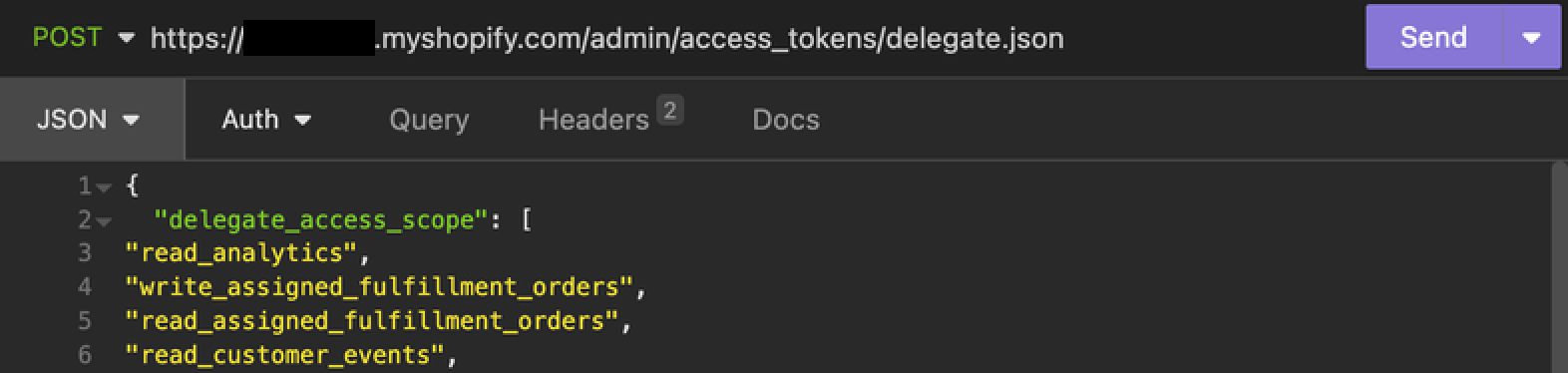
In the tool of your choice, start by creating a POST request to the correct shopify url to create a delegate access token. Replace parts of the url like shown below, so it applies to your shop, you are trying to set up.
https://<YOUR_SHOP_NAME>.myshopify.com/admin/access_tokens/delegate.jsonRequest headers
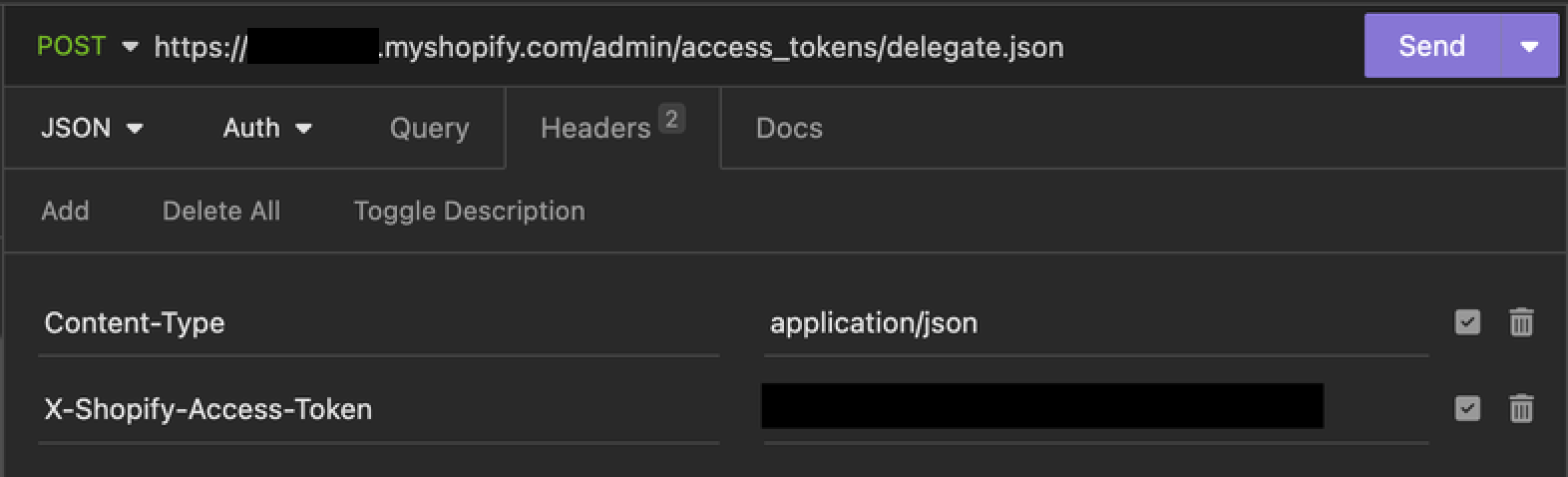
In the header section of the request add a field called X-Shopify-Access-Token. As value add the admin token, which we saved earlier. This will authenticate our request.
The admin token should look something like that:
shpat_abcd123567890xyzRequest body
The JSON body is used to define the permissions for our delegate token. This is similiar to when we defined the storefront and admin scope permissions. Here is the full list you can copy paste.
{
  "delegate_access_scope": [
"read_analytics",
"write_assigned_fulfillment_orders",
"read_assigned_fulfillment_orders",
"read_customer_events",
"write_customers",
"read_customers",
"write_custom_pixels",
"read_custom_pixels",
"write_discounts",
"read_discounts",
"write_discovery",
"read_discovery",
"write_draft_orders",
"read_draft_orders",
"write_files",
"read_files",
"write_fulfillments",
"read_fulfillments",
"read_gdpr_data_request",
"write_gift_cards",
"read_gift_cards",
"write_legal_policies",
"read_legal_policies",
"write_inventory",
"read_inventory",
"write_locations",
"read_locations",
"write_marketing_events",
"read_marketing_events",
"write_merchant_managed_fulfillment_orders",
"read_merchant_managed_fulfillment_orders",
"write_metaobject_definitions",
"read_metaobject_definitions",
"write_metaobjects",
"read_metaobjects",
"write_online_store_navigation",
"read_online_store_navigation",
"write_online_store_pages",
"read_online_store_pages",
"write_order_edits",
"read_order_edits",
"write_orders",
"read_orders",
"write_packing_slip_templates",
"read_packing_slip_templates",
"write_payment_customizations",
"read_payment_customizations",
"write_payment_terms",
"read_payment_terms",
"write_pixels",
"read_pixels",
"write_price_rules",
"read_price_rules",
"write_product_feeds",
"read_product_feeds",
"write_product_listings",
"read_product_listings",
"write_products",
"read_products",
"write_publications",
"read_publications",
"write_purchase_options",
"read_purchase_options",
"write_reports",
"read_reports",
"write_resource_feedbacks",
"read_resource_feedbacks",
"write_returns",
"read_returns",
"write_channels",
"read_channels",
"write_script_tags",
"read_script_tags",
"write_shipping",
"read_shipping",
"write_locales",
"read_locales",
"write_markets",
"read_markets",
"read_shopify_payments_accounts",
"read_shopify_payments_bank_accounts",
"read_shopify_payments_disputes",
"read_shopify_payments_payouts",
"write_content",
"read_content",
"write_themes",
"read_themes",
"write_third_party_fulfillment_orders",
"read_third_party_fulfillment_orders",
"write_translations",
"read_translations",
"read_all_cart_transforms",
"write_custom_fulfillment_services",
"read_custom_fulfillment_services",
"write_customer_merge",
"read_customer_merge",
"write_delivery_customizations",
"read_delivery_customizations",
"write_fulfillment_constraint_rules",
"read_fulfillment_constraint_rules",
"write_gates",
"read_gates",
"read_all_orders",
"unauthenticated_read_content",
"unauthenticated_read_checkouts",
"unauthenticated_read_customers",
"unauthenticated_write_customers",
"unauthenticated_read_customer_tags",
"unauthenticated_read_metaobjects",
"unauthenticated_read_product_listings",
"unauthenticated_read_product_inventory",
"unauthenticated_read_product_pickup_locations",
"unauthenticated_read_product_tags",
"unauthenticated_read_selling_plans",
"unauthenticated_write_bulk_operations",
"unauthenticated_read_bulk_operations",
"unauthenticated_write_gates",
"unauthenticated_read_gates"
  ]
}
If you’re not the store owner, you will have noticed, that not all permissions for the admin scope could be granted. As the admin scope now might be limited, not all rights can be granted to the delegate token as well. The request will return an error. In that case use this version of scopes:
{
"delegate_access_scope": [
"read_analytics",
"write_assigned_fulfillment_orders",
"read_assigned_fulfillment_orders",
"read_customer_events",
"write_customers",
"read_customers",
"write_discounts",
"read_discounts",
"write_discovery",
"read_discovery",
"write_draft_orders",
"read_draft_orders",
"write_files",
"read_files",
"write_fulfillments",
"read_fulfillments",
"read_gdpr_data_request",
"write_gift_cards",
"read_gift_cards",
"write_inventory",
"read_inventory",
"write_legal_policies",
"read_legal_policies",
"write_locations",
"read_locations",
"write_marketing_events",
"read_marketing_events",
"write_merchant_managed_fulfillment_orders",
"read_merchant_managed_fulfillment_orders",
"write_metaobject_definitions",
"read_metaobject_definitions",
"write_metaobjects",
"read_metaobjects",
"write_online_store_navigation",
"read_online_store_navigation",
"write_online_store_pages",
"read_online_store_pages",
"write_order_edits",
"read_order_edits",
"write_orders",
"read_orders",
"write_packing_slip_templates",
"read_packing_slip_templates",
"write_payment_customizations",
"read_payment_customizations",
"write_payment_terms",
"read_payment_terms",
"write_pixels",
"read_pixels",
"write_price_rules",
"read_price_rules",
"write_product_feeds",
"read_product_feeds",
"write_product_listings",
"read_product_listings",
"write_products",
"read_products",
"write_publications",
"read_publications",
"write_purchase_options",
"read_purchase_options",
"write_reports",
"read_reports",
"read_resource_feedbacks",
"write_resource_feedbacks",
"write_returns",
"read_returns",
"write_channels",
"read_channels",
"write_script_tags",
"read_script_tags",
"write_shipping",
"read_shipping",
"write_locales",
"read_locales",
"write_markets",
"read_markets",
"read_shopify_payments_accounts",
"read_shopify_payments_bank_accounts",
"read_shopify_payments_disputes",
"read_shopify_payments_payouts",
"write_content",
"read_content",
"write_themes",
"read_themes",
"write_third_party_fulfillment_orders",
"read_third_party_fulfillment_orders",
"write_translations",
"read_translations",
"read_all_cart_transforms",
"write_all_checkout_completion_target_customizations",
"read_all_checkout_completion_target_customizations",
"write_cart_transforms",
"read_cart_transforms",
"write_custom_fulfillment_services",
"read_custom_fulfillment_services",
"write_customer_data_erasure",
"read_customer_data_erasure",
"write_customer_merge",
"read_customer_merge",
"write_delivery_customizations",
"read_delivery_customizations",
"write_fulfillment_constraint_rules",
"read_fulfillment_constraint_rules",
"write_gates",
"read_gates",
"write_order_submission_rules",
"read_order_submission_rules",
"read_all_orders",
"unauthenticated_read_metaobjects",
"unauthenticated_read_product_listings",
"unauthenticated_read_product_inventory",
"unauthenticated_read_product_pickup_locations",
"unauthenticated_read_product_tags",
"unauthenticated_read_selling_plans",
"unauthenticated_read_bundles",
"unauthenticated_read_bulk_operations",
"unauthenticated_write_gates",
"unauthenticated_read_gates",
"unauthenticated_write_bulk_operations",
"unauthenticated_write_checkouts",
"unauthenticated_read_checkouts",
"unauthenticated_read_content",
"unauthenticated_write_customers",
"unauthenticated_read_customers",
"unauthenticated_read_customer_tags"
  ]
}
Bringing everything together
We now have everything what we need from shopify to run shophub. Update the .env file from the backend (state: 17.11.2023). The backend needs the access token for graphQL config file generation, named SHOPIFY_STOREFRONT_ACCESS_TOKEN and the delegate token, that we just generated, to make requests against shopify, named SHOPIFY_STOREFRONT_PRIVATE_TOKEN.
https://<YOUR_SHOP_NAME>.myshopify.com/api/<API_VERSION>/graphql.json

# Example
https://mystore.myshopify.com/api/2023-04/graphql.json
DevOps (Optional)
Optional can a graphiQL plugin directly be installed on the shopify store, to test out graphQL queries and investigate fetched data.
- Go to this url: Shopify GraphiQL App - Install (opens in a new tab)
- Insert the URL of your store
- Select all desired permissions. (Most of the time you will grant all permissions)
- Click install, this will redirect you to your store, where you are prompted one more time if you want to install the plugin.
After that the plugin should be installed and is now accessable on the stores admin page under
Apps > Shopify GraphiQL App