Header
In the Shophub framework, a header comprises one or more NavItems.
NavItems serve as the visible elements within the navigation bar, acting as primary actors in the navigation process. These NavItems may optionally contain children. When a NavItem possesses children, a mega menu becomes visible upon hovering over the navItem. Each of these child elements, referred to as NavItemChildren, represents a column within the generated mega menu.
NavItemChildren can further contain optional child elements known as NavItemChildrenChilds. These child elements can be either of type SmallFunnelWrapperBanner or NavTextContainer. The array of these banners represents the data within a row in a particular column of the mega menu.
Structure examples
Take a look at some examples, to further understand the possibilities, of how a header can be structured.
- Example 1
- Example 2
- Example 3
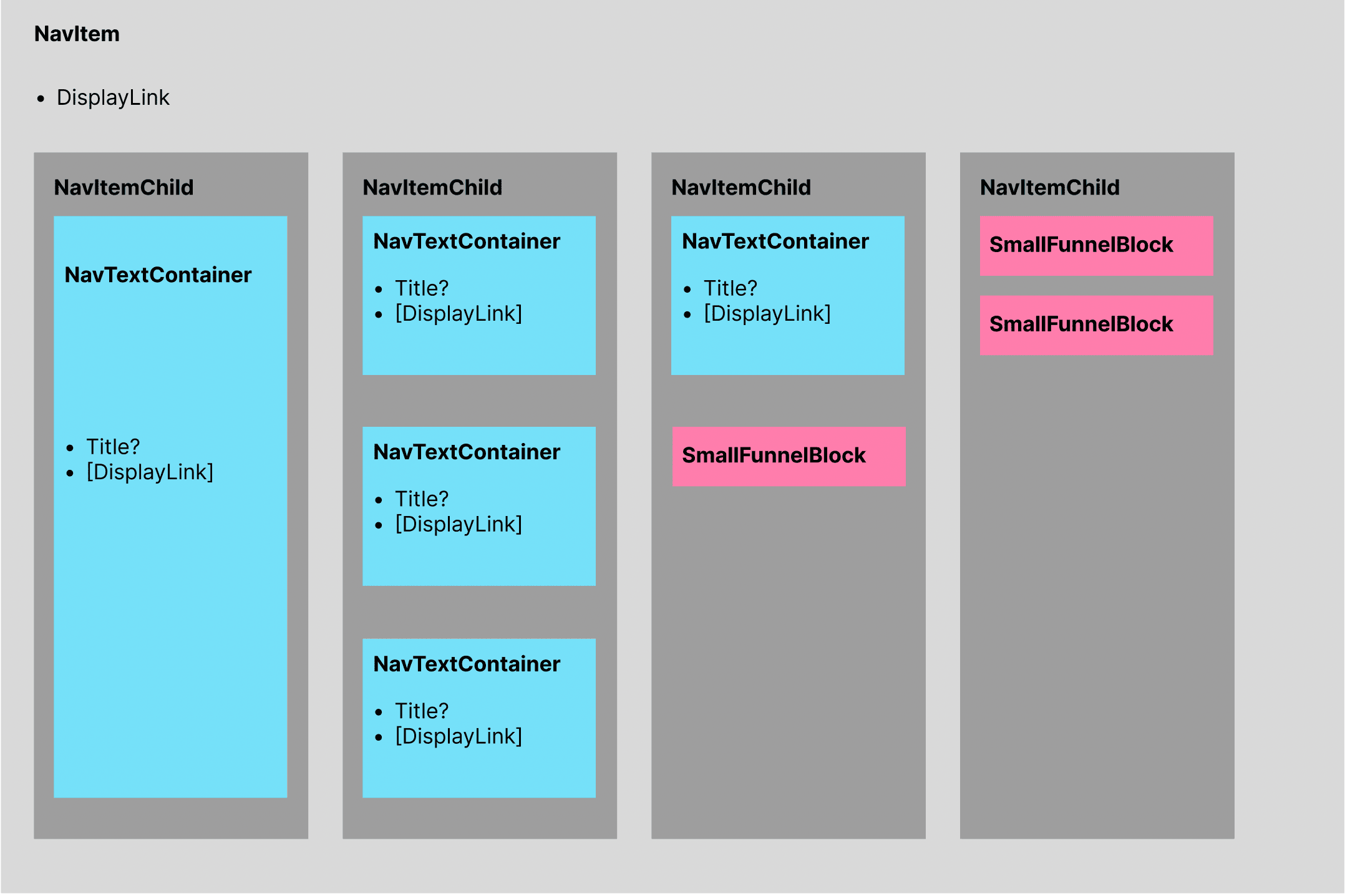
To summarize:
- NavItemChildren: Represents a column of data within the mega menu, which is a parent of a NavItem.
- NavItemChildrenChilds: Represents rows of data within the parent column NavItemChildren.
Create
POST _apiBaseUrl/v1/cms/structure/headerNavItemDto
Code
Let's look at an example, starting with the JSON data of an example request showcasing the NavItemDto, slowly working our way down into the nested objects of a header structure.
{
  "isDefault": false,
  "navItems": [
    {
      "displayLink": {
	  	"url": "#",
	  	"displayText": "Unsere Produkte",
	  	"descriptiveText": "Liste von allen Produkten"
	  },
	  "children": [...]
    },
    {
      "displayLink": {
	  	"url": "#",
	  	"displayText": "Über uns",
	  	"descriptiveText": "Über uns Seite"
	  }
    },
    {
      "displayLink": {
	  	"url": "/account",
	  	"displayText": "Account",
	  	"descriptiveText": "Account Seite"
	  }
    }
  ]
}
Arguments
Optionally, a parameter can be included to designate whether the header should serve as the default header. This default header is retrieved for all pages that do not specify a custom ID for their header. It's important to note that only one default header can exist at a time.
Before setting a new header as the default, it's necessary to either delete the existing default header or create the new one with the isDefault parameter set to false. Afterward, you can utilize the /v1/cms/structure/header/default endpoint to modify the default header.
A DisplayLink representing the clickable link direclty seen in the navbar.
An optional list of children, with each entry in the array, representing a column in the generated mega menu. If the children attribute is omitted, no mega menu will be rendered, for that navItem.
Render
Rendered would this example then look something like that:
- Desktop
- Mobile
 Only the first entry ‘Unsere Produkte’ shows a mega menu when hovered.
NavItemChildDto
Code
Let’s now take a closer look at a children array.
{
   "children":[
      {
         "items":[
            {
               "__typename":"NavTextContainer",
               "id":"6f48c175-aefd-413b-9343-a990ced50436"
            },
            {
               "__typename":"NavTextContainer",
               "id":"a60cb8fe-ba7a-4ee1-9f5f-4a1add0b2a5d"
            }
         ]
      },
      {
         "items":[
            {
               "__typename":"NavTextContainer",
               "id":"f7656b27-b416-4f30-962c-1055162549c5"
            }
         ]
      },
      {
         "items":[
            {
               "__typename":"SmallFunnelWrapperBanner",
               "id":"2982fe20-c21f-43f2-8a32-34539b180c7a"
            }
         ]
      }
   ]
}
Arguments
An array of entries, where each item represents a column in the mega menu.
Each entry is of type NavItemChild. Each NavItemChild has an optional list of child items, which represent the data for the row of the current column, the NavItemChildrenChilds.
The NavItemChildrenChilds objects. Simple array of banner reference items. Check the text about relationships on the CMS introduction for more information.
If no children is given in the items list, an empty column will be rendered in the mega menu. The items in the list are either a banner of type NavTextContainer or SmallFunnelWrapperBanner, which are only referenced, meaning that they have to be created first hand, before they can be used in the header. When the header gets deleted, the referenced children will not cascade delete themselves.
Render
Rendered would this example then look something like that:
- Desktop
- Mobile
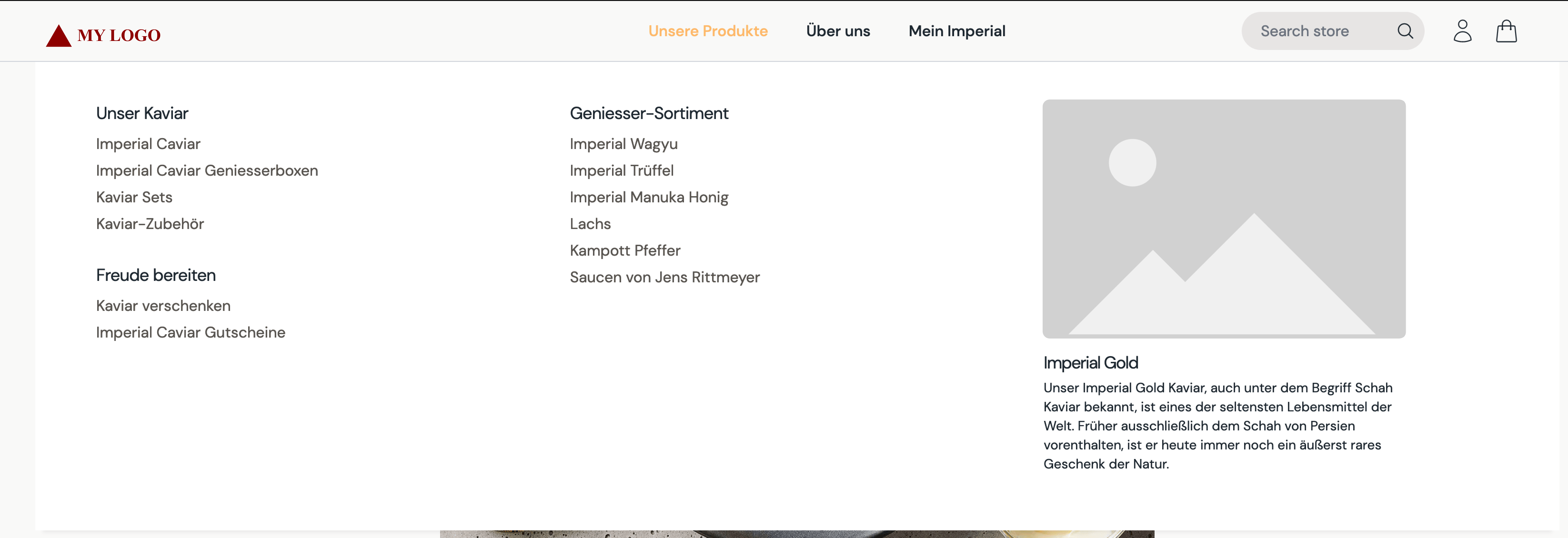 Since there are three entries in the children array for the ‘Unsere Produkte’ navItem, three columns are rendered. The first column has two referenced NavTextContainer, the second has one NavTextContainer and the third shows one SmallFunnelWrapperBanner.
Complete Code example
{
   "isDefault":false,
   "navItems":[
      {
         "displayLink":{
            "url":"#",
            "displayText":"Unsere Produkte",
            "descriptiveText":"Liste mit allen Produkten"
         },
         "children":[
            {
               "items":[
                  {
                     "__typename":"NavTextContainer",
                     "id":"6f48c175-aefd-413b-9343-a990ced50436"
                  },
                  {
                     "__typename":"NavTextContainer",
                     "id":"a60cb8fe-ba7a-4ee1-9f5f-4a1add0b2a5d"
                  }
               ]
            },
            {
               "items":[
                  {
                     "__typename":"NavTextContainer",
                     "id":"f7656b27-b416-4f30-962c-1055162549c5"
                  }
               ]
            },
            {
               "items":[
                  {
                     "__typename":"SmallFunnelWrapperBanner",
                     "id":"2982fe20-c21f-43f2-8a32-34539b180c7a"
                  }
               ]
            }
         ]
      },
      {
         "displayLink":{
            "url":"#",
            "displayText":"Über uns",
            "descriptiveText":"Über uns Seite"
         }
      },
      {
         "displayLink":{
            "url":"account",
            "displayText":"Account",
            "descriptiveText":"Account Seite"
         }
      }
   ]
}