Footer
In the Shophub framework, a footer comprises 0:n columns.
Each column can contain 0:n ColumnChildrenBanners. Each of those childrens are a supported banner type.
These banners are mostly entities, that could also be used standalone on the page itself.
The currently supported banners are the following:
- ImageBlock
- TextBlock
- ButtonBlock
- FooterLink
Structure example
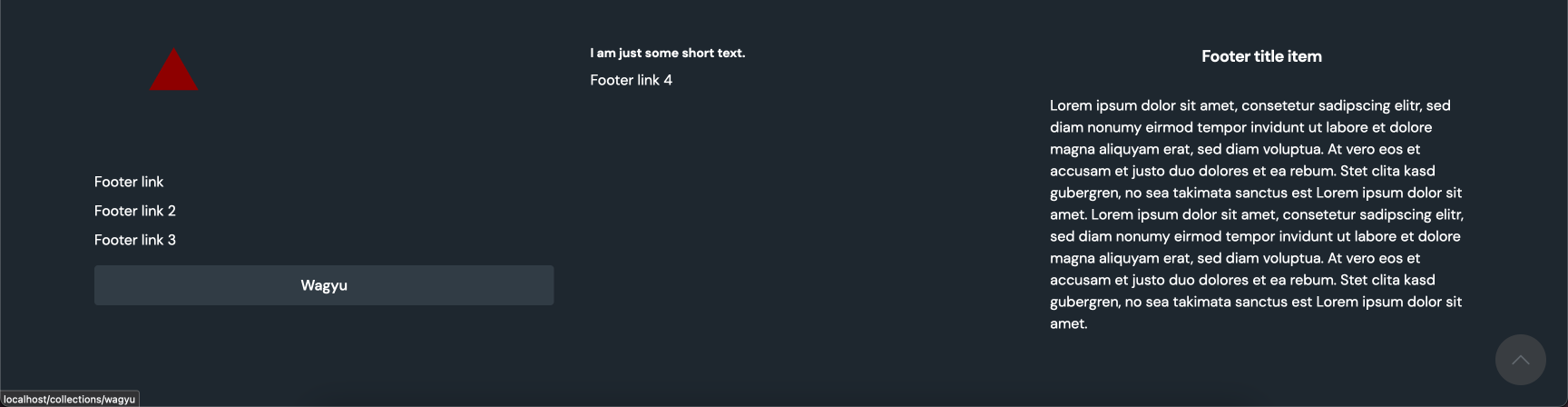
Take a look at the example, to further understand the possibilities, of how a footer can be structured. The example shows a footer with three columns.
- The first column contains an ImageBlock, three FooterLinks and a ButtonBlock.
- The second column contains a TextBlock followed by one FooterLink.
- The third and last column contains another two TextBlocks, where one is used as title and the other as text entity.
Create
POST _apiBaseUrl/v1/cms/structure/footerCreateFooterDto
Code
Let's look at an example, starting with the JSON data of an example request showcasing the CreateFooterDto, slowly working our way down into the nested objects of a footer structure.
{
   "isDefault":true,
   "columns":[
      {...},
      {...},
      {...}
   ]
}
Arguments
Optionally, a parameter can be included to designate whether the footer should serve as the default footer. This default footer is retrieved for all pages that do not specify a custom ID for their footer. It's important to note that only one default footer can exist at a time.
Before setting a new footer as the default, it's necessary to either delete the existing default footer or create the new one with the isDefault parameter set to false. Afterward, you can utilize the /v1/cms/structure/foooter/default endpoint to modify the default footer.
Each column entity inside the footer represents one actual column which is rendered in the footer. All entities inside one column, is then rendered as rows inside of the parent column.
If no columns attribute is provided or the array itself is empty, an empty footer is rendered.
FooterColumnDto
Code
Let’s now take a closer look at the column entity itself. Each column can contain an infinite amount of items. Those items are standalone banners that are injected into the footer column. Only the FooterLink can only exist inside a footer context.
All the banners have to be created beforehand, as they're only loosely connected to the column by referencing them by their id.
{
   "columns":[
      {
         "items":[
            {
               "__typename":"ImageBlock",
               "id":"my-image-block-id"
            },
            {
               "__typename":"FooterLink",
               "id":"my-footer-link-id"
            },
            {
               "__typename":"FooterLink",
               "id":"my-footer-link-id-2"
            },
            {
               "__typename":"FooterLink",
               "id":"my-footer-link-id-3"
            },
            {
               "__typename":"ButtonBlock",
               "id":"my-button-block-id"
            }
         ]
      },
      {...},
      {...}
   ]
}
Arguments
An array of entities, where each entity represents a row inside its parent column, referencing an externally created banner.
Check out the relationship page for more information about loosely connected banners.
Complete Code example
{
   "isDefault": true,
   "columns":[
      {
         "items":[
            {
               "__typename":"ImageBlock",
               "id":"my-image-block-id"
            },
            {
               "__typename":"FooterLink",
               "id":"my-footer-link-id"
            },
            {
               "__typename":"FooterLink",
               "id":"my-footer-link-id-2"
            },
            {
               "__typename":"FooterLink",
               "id":"my-footer-link-id-3"
            },
            {
               "__typename":"ButtonBlock",
               "id":"my-button-block-id"
            }
         ]
      },
      {
         "items":[
            {
               "__typename":"TextBlock",
               "id":"my-text-block-id"
            },
            {
               "__typename":"FooterLink",
               "id":"my-footer-link-id-4"
            }
         ]
      },
      {
         "items":[
            {
               "__typename":"TextBlock",
               "id":"my-text-block-id-3"
            },
            {
               "__typename":"TextBlock",
               "id":"mytext-block-id-4"
            }
         ]
      }
   ]
}